Showing posts with label MOBILE. Show all posts

Friday, 7 October 2011

Remove Windows 7 Activation With DeathWAT

| |
0 comments

Wga_thumbDeathWAT version 3.2.1 makes windows 7 act as activated , and you can run windows as long as you want without activation and giving any product key. Works both on 32 and 64 bit windows. Just run the exe fill and accept all the confirmations . Enjoy with full version of windows 7.


Read More

Wednesday, 5 October 2011

Remove Passwords from your PDF Files

| |
0 comments

You have a bunch of PDF files on your computer that are protected by a long and complex password. You know the passwords but it still feels inconvenient and boring typing them each time you have to open a PDF file.

Is there a tool available that can remove password protection from PDF files? Someone asked me this question on Twitter the other day and the answer is obviously yes.

pdf password

Removing Password from a PDF File


There’s a free Windows utility called BeCyPDFMetaEdit that can help you remove passwords from PDF files* but without make any other change to the document. (I am not sure why the developers picked such a complex name for this useful utility).

Here’s what you need to do:

1. Launch the program and it will ask your for the location of the PDF file.

2. Before you select and open the PDF, change the mode to “Complete Rewrite.”

3. Switch to the Security tab and set the “Security System” to “No encryption.” Click the Save button and your PDF will no longer require a password to open.

[*] If you would like to test this tool but do not have a password-protected file, use this sample PDF (the password is labnol).

For more tips, check this detailed guide on PDF tools.
LIKE US
Read More

Transform Windows 7 To Android Like Look With Android Skin Pack

| |
0 comments

windows-7-e1265195691849_thumb
Earlier we have covered about Transforming Windows 7 to Mac Like Look . Now, Hamed, the developer of these skin packs has developed a Pack to convert Windows 7 to Android like look.


To get started run the exe file after downloading from the link given at the bottom.
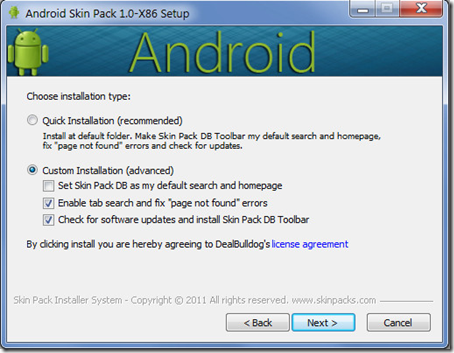
1_thumb%25255B6%25255D
Set your custom settings , see above for recommended settings.
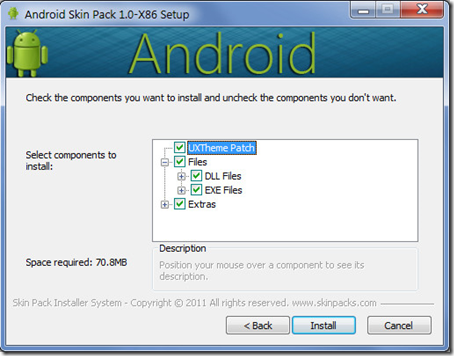
2_thumb%25255B1%25255D
After clicking install you will get a screen like shown below.
3_thumb%25255B2%25255D
After Successful install your computer will look like screenshot shown below.
Sample_thumb
For all screen shots and to Download Visit
Android Skin Pack for 64 bit
Android Skin Pack for 32 bit
Note : Before Installing Disable User Accounts Control

Read More

Tuesday, 4 October 2011

GET WINDOWS 7 START SCREEN FOR YOUR ANDROID MOBILE

| |
0 comments
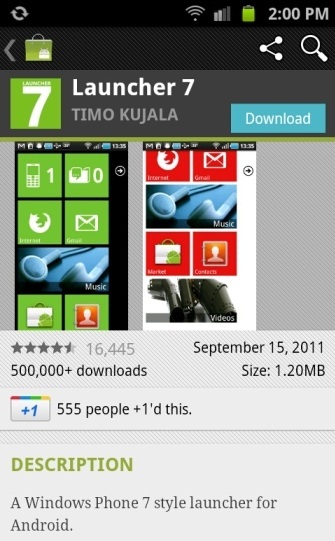
If you are Android Mobile user and bored of Android’s traditional interface, or you want to change with something new. So with the help of free android app Launcher7 you can get Windows phone 7 Home screen on your Android smartphone. Launcher 7 is quite simply a launcher that replaces your standard home screen with the sleek, tiled look of Windows Phone 7.
With the help of this Freeware android app you can change the colors of the tiles, change their icons, add or remove apps from the home screen, and even add Android widgets as their own tiles.

Follow the below Instruction to get the Windows phone 7 Home screen on your Android smartphone:-

1. Download and install Launcher 7 app from android market.


 2. After the Installation hit the Home button and Select Launcher 7.

3. Now you can see the new Windows Phone 7 home Screen on your Android mobile.

4. Now you can also customize your screen and also add some more app om the screen. To add more app on the screen, press and hold on the app icon, now you can see the new option “Pin to Home Screen” Tap on it to add the app on home screen.

5. Thats it now your favorite app is on home screen, Just long press on a app tile and drag tile where you want.
Read More

New Ucweb Browser Mini

| |
0 comments

New Ucweb Browser Mini 8.0 has been released and available for download, well it has fixed many things so its really great for download you can check all the newfeatures below.
 

Features of Ucweb Browser 8.0 .:

  • Optimized for Low-end S40 phones and other low memory phones.
  • Bookmarking any page further optimized, easy to operate.
  • Network, support menu actions.
  • Repair the night mode does not display a picture of the problem.

DOWNLOAD HERE

Read More

get windows 8 feel on windows7

| |
0 comments


If you want to try the new Windows 8 Experience like Windows 8 Login Screen, Themes, Wallpapers, Metro UI, Aero’s Auto-Colorization, Taskbar UserTile and much more on your Windows 7 PC, try this tool Windows 8 UX Pack. It’s afreeware app which allows you to try the experience of Windows 8 on Windows 7 PC.
Windows 8 UXP is compatible with both Windows 7 x86 and x64. To use this app you have to uninstall any previous Windows 8 packs if you already using them. Its simple to use and you can also uninstall easily from Control panel.
Download the Windows 8 UX Pack from here and install it in your Windows 7 PC.


Also see: Get Windows 8 style for Browser
Also See: Change Win 8 start screen
After the installation you can see the new Windows 8 Start Screen on your Windows 7 Desktop.

Features of Windows 8 UX Pack

1. M3 user interface for installation/configuration

2.One-click installation/configuration

3. UxStyle memory patching

4. Windows 8 Aero Glass or Lite theme

5. Instant M2 and M3 wallpaper/logon screen customization

6. UserTile with current user/wallpaper auto configured on login


Read More